Environment
Categories:
11 minute read
You can’t focus. You’re reading the same paragraph for the third time. Your mind wanders. You check your phone. Ten minutes later you haven’t made progress.
Maybe you’re not the problem. Maybe it’s where you’re studying.
Your environment has massive impact on your ability to focus and retain information. Study in bed and your brain thinks it’s sleep time. Study surrounded by clutter and your brain is distracted by visual noise. Study under dim lighting and you get drowsy.
The good news: optimizing your study environment costs almost nothing and makes studying significantly easier.
This isn’t about having a perfect Pinterest-worthy setup. It’s about understanding what actually helps you focus and what sabotages you.
Location Matters
Desk vs Bed vs Couch
Your bed is for sleeping. Not studying.
When you study in bed, you teach your brain that bed = work. This makes falling asleep harder. Your brain doesn’t know if it’s supposed to be alert or relaxed.
Context-dependent memory is real. Your brain associates environments with activities. Study in bed and you’ll struggle to recall information later when you’re sitting in a classroom taking the exam.
Study in the same type of environment where you’ll need to perform. If you’re taking exams at a desk in a quiet room, study at a desk in a quiet room. Your brain will recall information more easily in similar contexts.
Desk is best:
- Forces upright posture (better alertness)
- Creates mental separation between work and rest
- Easier to take notes, spread out materials
- Better ergonomics for long sessions
Couch is mediocre:
- Too comfortable = drowsiness
- Poor posture = back pain during long sessions
- Easy to get distracted by TV or other people
Bed is worst:
- Brain associates it with sleep
- Terrible posture
- Too comfortable to maintain focus
- Ruins your sleep quality long-term
If you absolutely must study on your bed (dorm room situation), at least sit up against the wall with a pillow behind your back. Don’t lie down.
Home vs Library vs Coffee Shop
Each has pros and cons.
Home
- Pros - Convenient, free, control over environment, no commute
- Cons - Distractions everywhere (roommates, video games, TV, fridge), lack of social pressure to focus
- Best for - Solo deep work when no one else is home, short study sessions between classes
Library
- Pros - Quiet, free, surrounded by people also working (social pressure to focus), all study materials available, no home distractions
- Cons - Might be crowded, less flexible (hours, noise policies), can’t eat/drink freely
- Best for - Long focused study sessions, exam prep, when you can’t focus at home
Coffee Shop
- Pros - Moderate background noise (some people focus better with ambient sound), change of scenery, coffee/snacks available
- Cons - Costs money, can be loud or crowded, WiFi may tempt you to get distracted, no guarantee you’ll get a table
- Best for - Creative work, reading, studying material that doesn’t require complete silence
Studying in different locations can actually improve retention. The variety of contexts gives your brain more retrieval cues. Library one day, coffee shop another, quiet room at home a third. Just keep the environments similarly focused.
Mix and match based on the task:
- Heavy memorization work → Library (quiet)
- Reading and note-taking → Coffee shop (ambient noise)
- Practice problems → Home desk (convenience, can talk through problems out loud)
Lighting: Brighter is Better
Lighting affects your alertness, mood, and ability to focus.
Natural light is best.
Studies consistently show natural light improves concentration, reduces eye strain, and boosts mood. A 2020 study of European schoolchildren found positive relationships between daylight exposure and performance on mathematical and logical tests.
If you can:
- Study near a window
- Face the window (don’t have it behind your screen causing glare)
- Open blinds during daytime
Artificial Lighting
If natural light isn’t available (nighttime, windowless room), use bright artificial light.
Color temperature is measured in Kelvin (K) and describes how “warm” (orange/yellow) or “cool” (blue/white) light appears. Lower numbers (1,000-3,000K) produce warm, orange-tinted light like candlelight or sunset. Higher numbers (5,000-10,000K) produce cool, blue-tinted light like a clear sky or daylight.
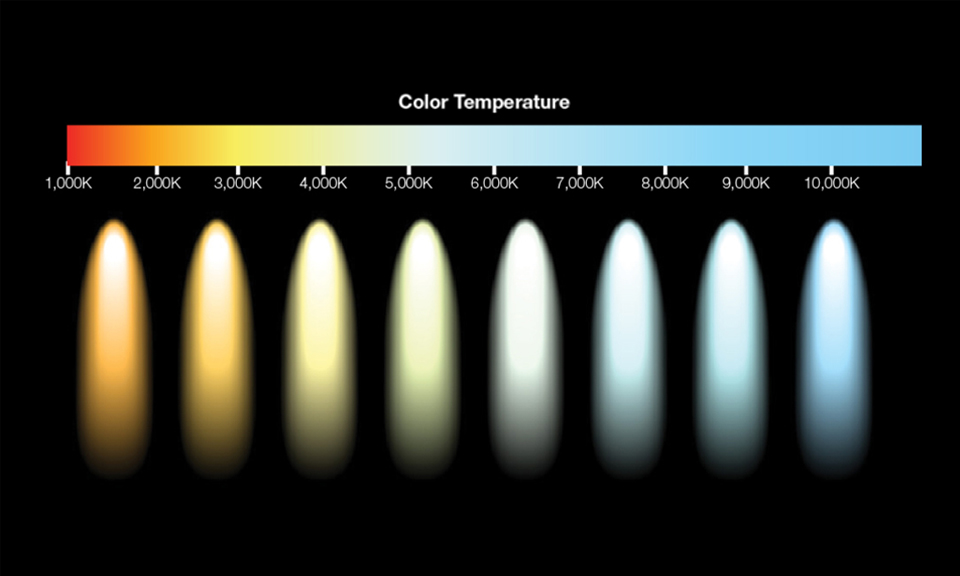
- Cool white light (4000-5000K) - Better for focus and alertness
- Warm light (2700-3000K) - Relaxing, better for winding down
For studying, you want bright, cool light. This mimics daylight and keeps you alert.
Avoid:
- Studying in dim lighting (makes you drowsy)
- Only using a desk lamp (creates harsh shadows and eye strain)
- Backlighting (light behind your screen) which causes glare
Overhead light + desk lamp is ideal. Overhead provides general brightness, desk lamp illuminates your work directly.
Bright cool light is great for studying but suppresses melatonin (the sleep hormone). If you’re studying late, use f.lux or Night Shift on your devices to reduce blue light 2-3 hours before bed. Or switch to warm lighting for evening study sessions.
Quick fix:
- If your room is dim, buy a bright LED desk lamp (1000+ lumens, 4000-5000K). They’re $20-40 and make a huge difference.
Temperature: Cooler Wins
Research shows cognitive performance peaks at around 70-72°F (21-22°C).
Too hot = drowsiness and reduced focus. Your body wants to cool down and rest.
Too cold = distraction. You’re thinking about how cold you are instead of studying.
Optimal:
- Slightly cool (68-72°F / 20-22°C)
- Wear a light layer if needed for comfort
If you’re in a dorm or can’t control the thermostat:
- Open a window if it’s too hot
- Use a fan to move air
- Wear warmer clothes if it’s too cold
Clean Desk vs Chaos
This one is personal preference, but research leans toward clean.
The Case for Clean
Research on visual cognition has found that cluttered visual scenes compete for your attention and reduce your ability to focus. Visual distractions literally decrease working memory capacity.
Clean desk = fewer visual distractions = easier to focus.
Try this: Study at a cluttered desk for an hour. Rate your focus 1-10. Next day, clear everything off your desk except your study materials. Study for an hour. Rate your focus again. Most people notice a significant difference.
However
Some people with ADHD or certain thinking styles actually focus better with moderate visual stimulation. Complete emptiness can be distracting.
Find your version:
- Minimalist - Desk has only current study materials + water + lamp
- Organized chaos - Stuff is there but organized (books stacked neatly, papers in folders)
- Stimulation - A few meaningful items (plant, photo, small decoration) without overwhelming clutter
Avoid:
- Random piles of unrelated stuff
- Dirty dishes
- Laundry on your desk
- Things that don’t serve your current task
At minimum: Clear a 2x2 foot workspace for your current task. Push everything else to the side.
The Phone Problem
Let’s be honest: your phone is the #1 destroyer of focus.
Every notification, every buzz, every “I’ll just check it real quick” costs you.
The Research is Brutal
A study from the University of Texas found that having your phone visible on the desk reduces cognitive capacity, even if it’s off and face-down. Your brain is using resources to resist checking it.
Just having it in the room reduced test scores.
“I’ll just have it on silent” doesn’t work. You’ll still check it. Put your phone in another room, in a drawer, in your backpack. Out of sight, out of mind. Your focus will improve dramatically.
Solutions
- Physical separation - Put your phone in another room. Can’t check what you can’t reach.
- Use Forest or similar apps - Gamifies not touching your phone with Forest. Plant a tree, if you unlock your phone, the tree dies.
- Airplane mode + lock it away - Extreme but effective for high-stakes studying (exam prep).
- Designated phone breaks - Study 50 minutes, check your phone for 10. Then put it away again.
“But I Need It for Music/Timer/Calculator”
- Music - Use a computer or dedicated music player
- Timer - Use a physical timer or watch
- Calculator - Buy a $10 scientific calculator
Your phone is not a study tool. It’s a distraction machine.
Ergonomics: Your Back Matters
You’re studying for 2-4 hour sessions. Ergonomics matters.
Proper Setup
- Chair - Supports your lower back, feet flat on floor (or footrest), thighs parallel to ground
- Desk height - Elbows at 90° when typing or writing
- Screen height - Top of screen at or slightly below eye level (prevents neck strain)
- Distance - Screen 20-24 inches from your eyes
What happens if you ignore this:
- Back pain (makes focusing impossible)
- Neck pain (from hunching over)
- Eye strain (from poor screen position)
- Fatigue (poor posture reduces oxygen flow)
You don’t need a $1,000 office chair. But you do need something adjustable and supportive.
Budget fixes:
- Roll up a towel for lumbar support
- Use a box as a footrest if your feet don’t touch the ground
- Stack books under your laptop to raise screen height
- Use an external keyboard if your laptop screen is too low
Every 20 minutes, look at something 20 feet away for 20 seconds. This reduces eye strain from staring at books or screens. Stand and stretch briefly while you do this.
Noise: It’s Complicated
Some people need silence. Others focus better with background noise.
This is personal and also task-dependent. We cover this in depth in Silence vs Music, but here’s the quick version:
For most people:
- Deep focus work (memorization, problem-solving) - Silence or instrumental music
- Reading/note-taking - Ambient noise or lo-fi music works fine
- Creative work - Moderate background noise sometimes helps
If you need silence: Library, noise-canceling headphones, study late at night/early morning
If you like background noise: Coffee shop, white noise, lo-fi hip hop, rain sounds
Avoid: Music with lyrics while reading (competes for language processing), loud/unpredictable noise (startles you out of focus)
Dedicated Study Space
If possible, have a specific place you only use for studying.
This creates a psychological trigger. Sit at that desk → brain knows it’s time to focus.
Why this works:
- Context-dependent learning (you associate that space with studying)
- Reduces decision fatigue (no “where should I study today?”)
- Builds habit (same place, same time, same activity)
If you share a room or don’t have space for a dedicated desk:
- Use a specific corner
- Face a specific direction
- Use a “study blanket” that you only sit on during study time (creates portable study space)
The key is consistency. Your brain learns “when I’m here, I focus.”
Supplies Within Reach
Nothing kills momentum like having to stop and search for a pen.
Have ready before you start:
- Pens/pencils (multiples, in case one runs out)
- Highlighters
- Notebook/paper
- Textbooks and materials for this session
- Water bottle
- Charger
- Calculator (if needed)
- Sticky notes or index cards
Don’t get up mid-study session to find supplies. That breaks flow and gives you an excuse to check your phone or get distracted.
Get a small organizer or drawer to keep all study supplies together. Grab it when you sit down to study. Everything you need in one place.
What About Multiple Monitors?
If you’re using a computer for studying (research, writing papers, online coursework), multiple monitors can help.
Benefits:
- View textbook PDF on one screen, write notes on the other
- Research paper on one screen, citations/sources on the other
- No constant alt-tabbing (which breaks focus)
Risks:
- Easier to have YouTube or social media open “just in case”
- More screen = more distractions
Make it work:
- One screen for work, second screen for work-related reference only (no entertainment)
- Use full-screen mode to reduce distraction
- Turn off the second monitor if you don’t need it for the current task
Monitors are tools. Use them intentionally.
Digital Environment
Your digital workspace matters too.
Clean Computer Desktop
- Close unnecessary tabs (every tab is a micro-distraction)
- Close email/Slack/Discord
- Use distraction blockers (Freedom, Cold Turkey, LeechBlock)
- Turn off notifications system-wide
Use Focus Mode
- MacOS has Focus modes
- Windows has Focus Assist
- Both silence notifications and hide distractions
Your digital environment can be as cluttered as your physical desk. Clean both.
Summary
Your study environment is not decoration. It’s a performance tool.
Optimize for focus:
- Location: Desk > couch > bed. Mix home/library/coffee shop based on task.
- Lighting: Bright natural light if possible. Cool white artificial light (4000-5000K) for focus.
- Temperature: Slightly cool (68-72°F / 20-22°C).
- Clean desk: Minimal visual clutter. Only current materials + water + light.
- Phone away: Different room. Out of sight completely.
- Ergonomics: Supportive chair, desk at elbow height, screen at eye level, 20-20-20 rule.
- Dedicated space: Study in the same place consistently to build habit.
- Supplies ready: Everything you need within arm’s reach before you start.
- Digital cleanliness: Close unnecessary tabs and apps, silence notifications.
You don’t need a perfect setup. But you do need to be intentional. Small changes to your environment create significant improvements in focus.
Test what works for you. Try studying in different environments and notice where you’re most productive. Then engineer that environment deliberately.
Make it easy to focus and hard to get distracted.